March 5, 2026

Maina Susan is a Tax & Finance Writer at Quartet Solutions, simplifying tax regulations and financial concepts to help businesses stay compliant.
LinkedIn >>Estimated read time: 4 minutes
Table of Contents
1. Introduction
3. Who Needs to Register for ETIMS in Kenya?
4. Preparing Before Creating an Invoice in ETIMS
5. Step-by-Step Guide: Creating an Invoice using ETIMS
6. FAQs About Creating an Invoice using ETIMS in Kenya
7. Conclusion
8. Disclaimer
If you run a business in Kenya, generating invoices is part of your daily operations right?
But did you know that the Kenya Revenue Authority (KRA) now requires businesses in Kenya to issue electronic tax invoices via ETIMS?
Don’t worry – this guide by Quartet Consulting will walk you through the process of creating an invoice using ETIMS in Kenya, step by step.
Even if this is your first time, by the end of this article, you’ll be able to generate your invoices confidently.
Quartet Consulting can guide your business step by step, making invoice creation fast, simple, and fully compliant with KRA regulations.
Book Your Free Consultation with Quartet Consulting TodayWhatsAppETIMS (Electronic Tax Invoice Management System) is an online system by KRA that allows you to generate, validate, and share electronic invoices instantly.
It is mandatory for all registered businesses to use this system to improve compliance, reduce fraud, and manage stock.
Gone are the days of manual invoicing or expensive hardware. ETIMS makes invoicing faster, easier, and fully compliant with Kenyan tax laws.
If you earn business income in Kenya, ETIMS applies to you. This includes:
| Type of Business / Person | Notes for you |
|---|---|
|
VAT-registered businesses
|
– You must use ETIMS for all your transactions.
|
|
Non-VAT businesses
|
– You still need ETIMS, even if you’re a small trader or previously exempt.
|
|
Service providers |
– This includes consultants, lawyers, engineers, and agents.
|
|
Retailers and traders |
– You as an SME or informal trader must register.
|
|
Rental income earners |
– You must register if you earn monthly rental income (MRI).
|
|
Exempt businesses |
– You still need ETIMS, even if you are a school, hospital, or NGO conducting business.
|
Bottom line: If you have a business in Kenya, you need ETIMS to stay compliant.
Note:
Planning to register for ETIMS in Kenya? Follow our step-by-step guide with screenshots on “How to Register for ETIMS in Kenya.”
Before you start creating an invoice using ETIMS in Kenya, it is important to prepare a few key details to ensure accuracy and compliance.
| Key Area | What you Need to Know |
|---|---|
|
1. VAT Considerations
|
Make sure you correctly indicate which items attract VAT when creating your invoice. |
|
2. Accurate Category Selection
|
This step ensures that your invoices remain compliant with KRA regulations. |
|
3. Customer Information
|
Accurate customer information is essential for generating a valid invoice and avoiding delays in payment processing. |
We help SMEs, NGOs, and service providers create invoices, ensure VAT and customer details are accurate, and stay fully compliant with KRA — hassle-free.
Book Your Free Consultation with Quartet Consulting TodayWhatsAppHere’s how you can generate your first invoice on ETIMS in Kenya:
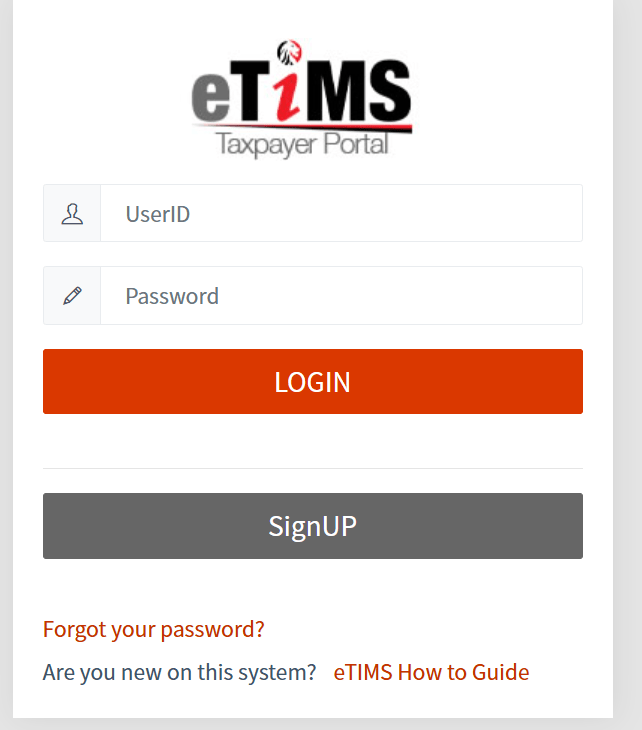
Step 1: Log in to Your ETIMS Account
Visit the ETIMS Portal and log in using your registered credentials.
Accessing your account is the first step in creating an invoice using ETIMS in Kenya.
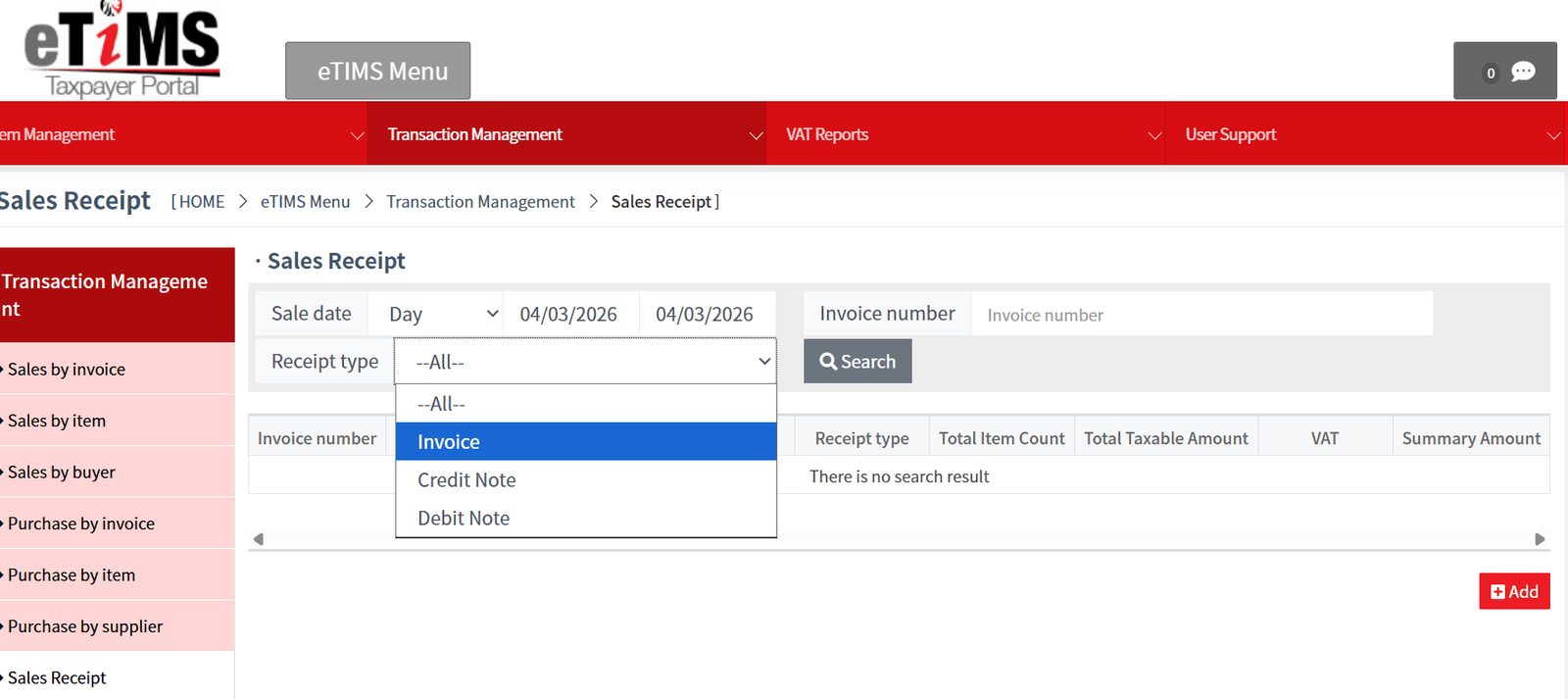
Step 2: Navigate to “Sales Receipt”
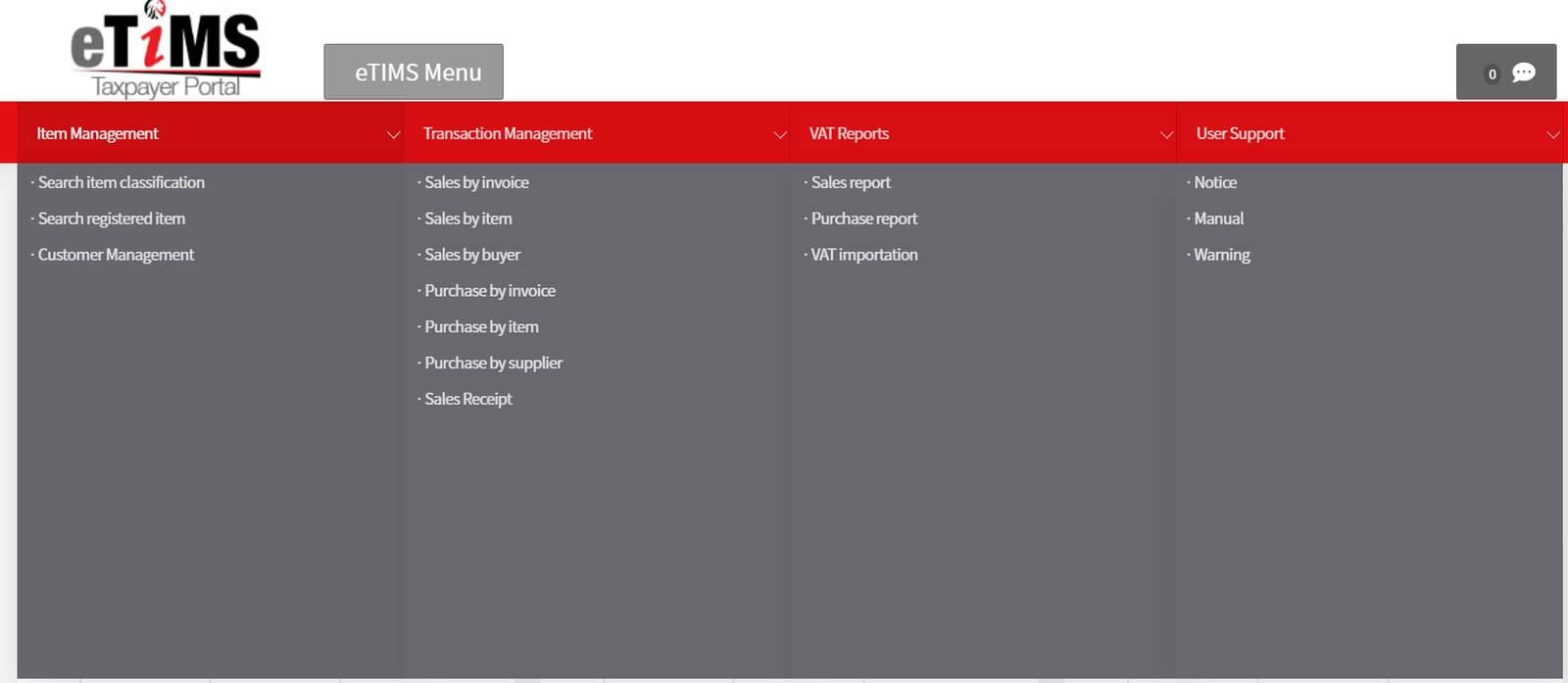
Once logged in, locate the dashboard menu and click on “Sales Receipt.”
This is the section where all invoices are created and managed.It’s the last item on the “Transaction management” column.
Step 3: Set Invoice Details
Click the “+” button at the top-right corner to begin creating your invoice.
Step 4: Input Buyer Details
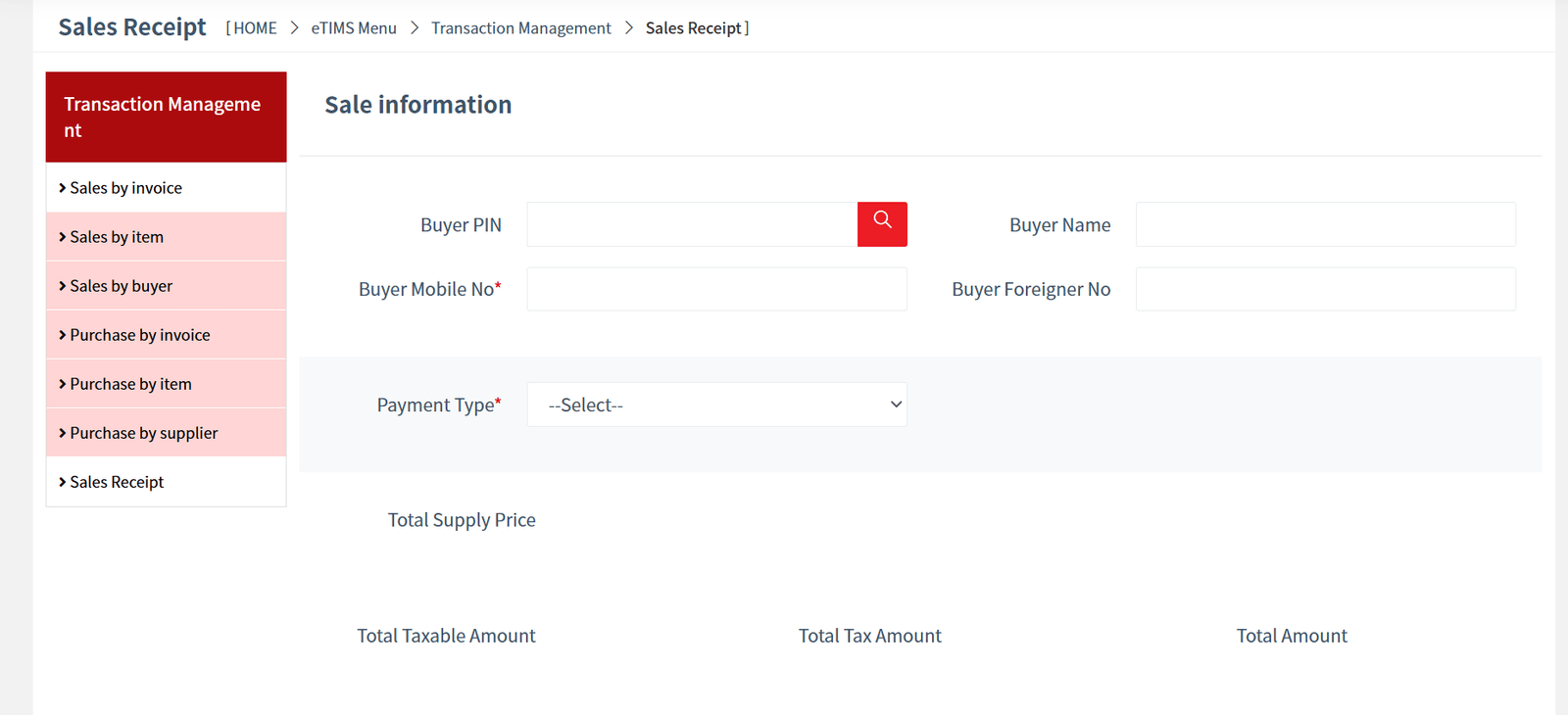
Enter the buyer’s information carefully:
Accurate customer details are crucial for validation and seamless payment processing.
Step 5: Choose Payment Type
Select the suitable mode of payment by the customer : MPESA, Cash, Bank, Cheque, or any other applicable method.
Step 6: Add Sale Items
For each item you are selling, provide the following details:
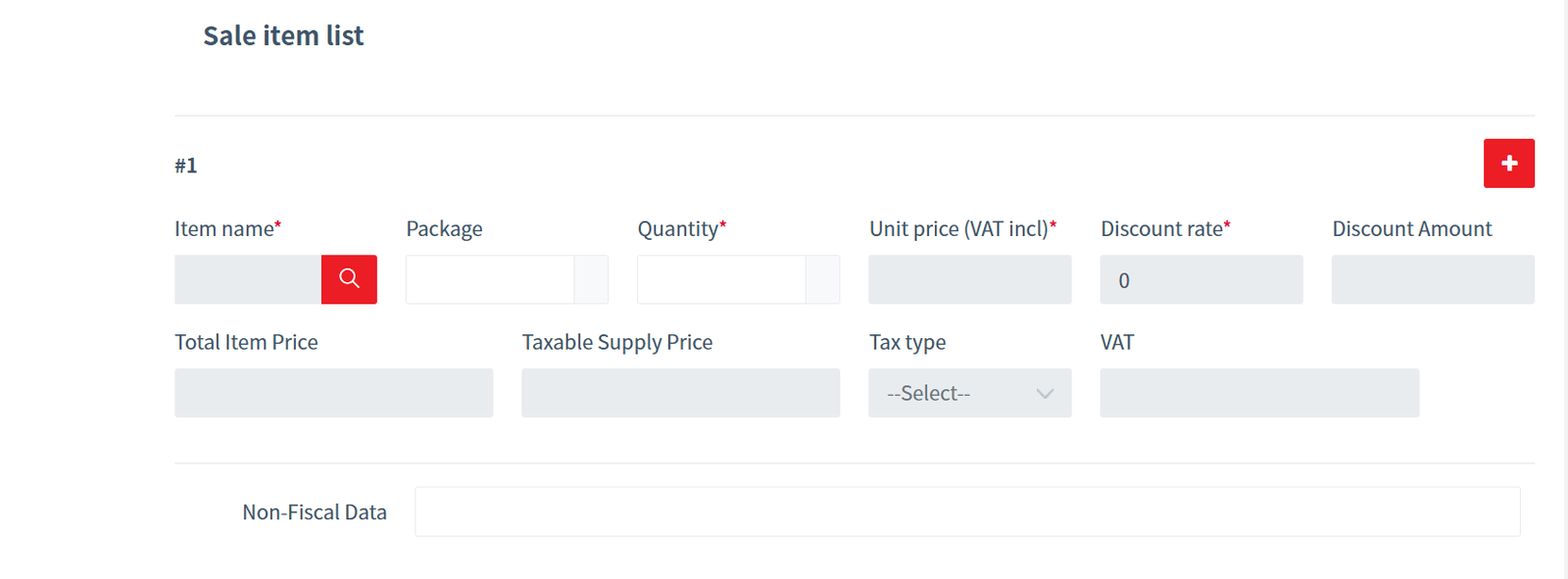
If you are selling multiple items, click the “+” button to add more items. Ensure each item is correctly categorized for compliance with KRA requirements.
Step 7: Finish and Save Your Invoice
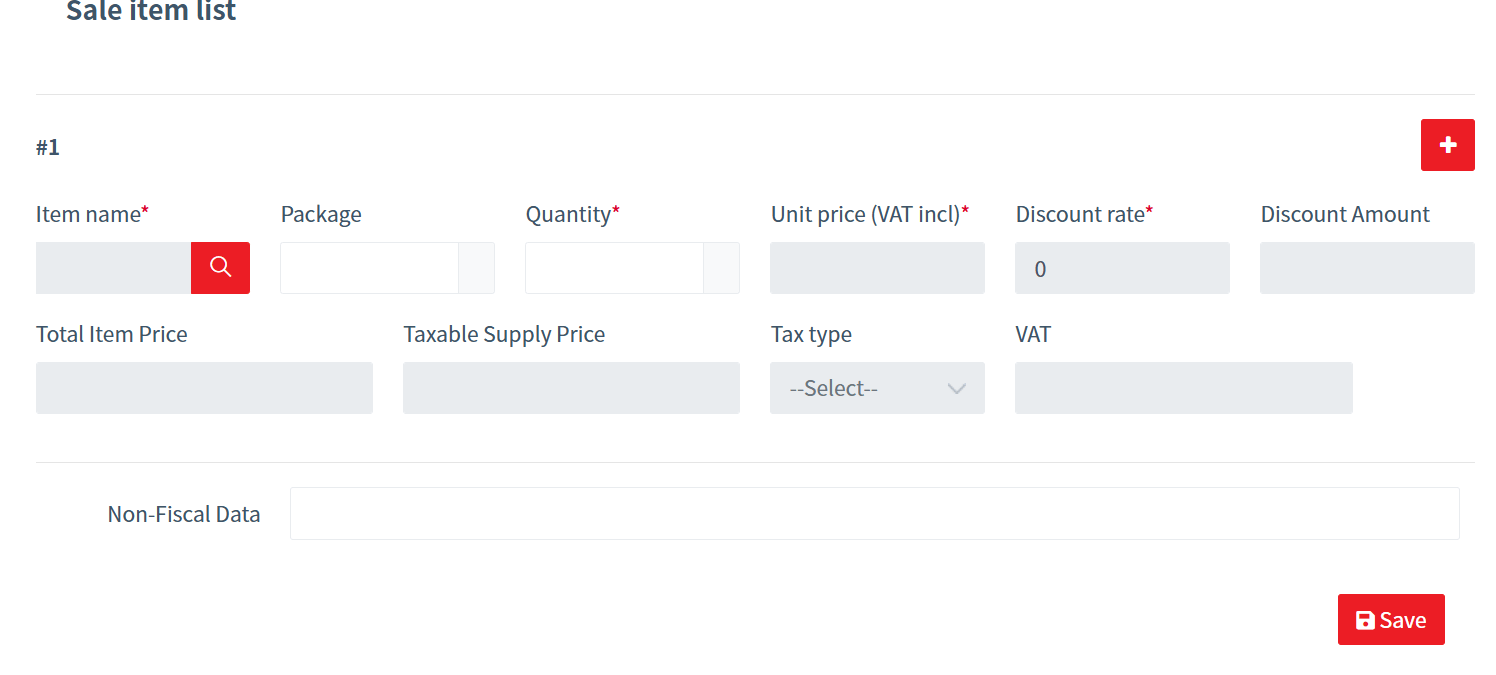
After entering all sale items:
Congratulations! You’ve successfully completed creating an invoice using ETIMS in Kenya. You can now share the invoice with your customer to facilitate payment.
1. What are the fees for generating an invoice using ETIMS in Kenya?
2. Can I create an ETIMS invoice by myself?
3. How do I register for ETIMS in Kenya?
4. What are the requirements for using ETIMS in Kenya?
Before you start creating an invoice using ETIMS in Kenya, make sure you have the following:
5. Can I generate an ETIMS invoice even if I’m not registered for VAT?
Creating an invoice using ETIMS in Kenya is straightforward, efficient, and essential for every business owner.
By following the step-by-step process outlined in this guide, you can generate invoices that are fully compliant with KRA regulations, professional in appearance, and easy for your customers to pay.
Whether you are a small trader, an SME, or a larger enterprise, mastering creating an invoice using ETIMS in Kenya ensures your business remains tax-compliant and organized.
Click the WhatsApp button to book your free consultation with Quartet Consulting now
Or call us at 0737 570 370
WhatsAppThis guide is for informational purposes only.
Quartet Consulting is not responsible for any errors or omissions, and you should always confirm ETIMS requirements directly with the Kenya Revenue Authority (KRA).